

1. Building blocks: questions, modules, KPIs, and dimensions
For every level of the hierarchy, the same operations are available: create, edit, duplicate, and delete. Fields are always managed per language.1.1 Dimensions
The dimension is the top level. You create a dimension with a name and an optional description. Dimensions must exist before you can link KPIs or modules to them.Dimensions aren’t managed on their own tab — you set a module’s or KPI’s dimension inline, while creating or editing that module or KPI.
1.2 Questions
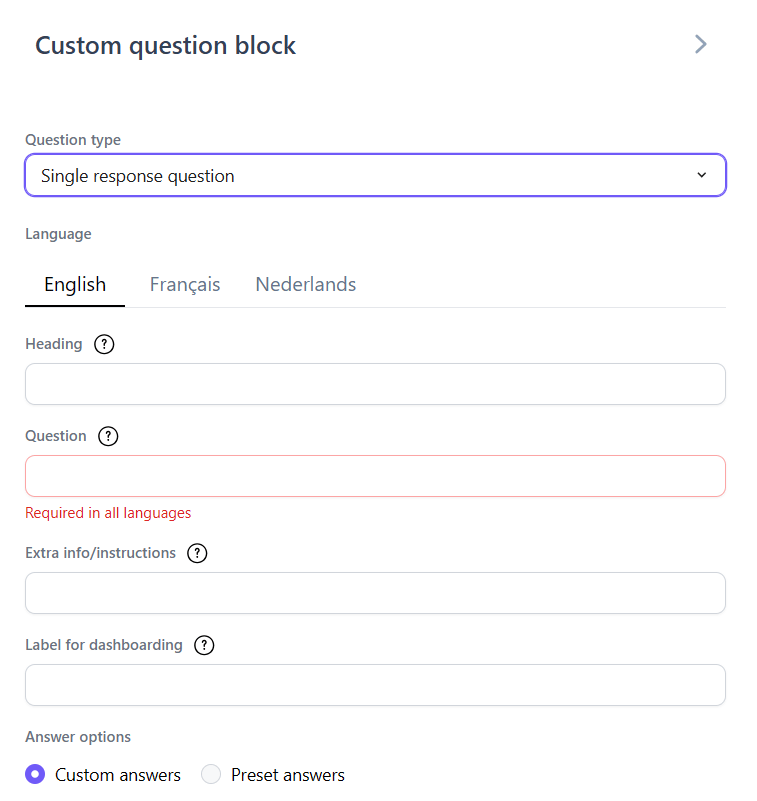
A question includes, among other things:- Heading — an optional larger heading line shown above the question itself, for grouping or introducing it.
- Question (the caption — the question text itself, required in all languages).
- Extra info/instructions (subcaption) and a dashboard label (“Label for dashboarding” — a short label used on the dashboard) — both optional.
- Question type (see the Creating a Survey guide).
- Answer options — either custom answers, or a reusable answer template (answer set).
- Score interpretation — a Positive / Neutral / Negative setting per question, defaulting to Neutral, that determines how the answer feeds into the 0–100 score (see the Survey Analysis guide).
- Optional “not applicable” option, and whether the question itself is optional.
- Link to one or more modules and to dimensions.
If you edit a question that’s already used in a survey, this affects all surveys that use that question. When deleting a question, the platform warns you if it’s linked to a module.
1.3 Modules
A module groups questions around one theme. When creating one, you set: name, description, linked dimension, job demand-resource type (Stressor, Resource, Outcome, Personal, Ambiguous, or N/A), frequency, and the underlying questions. A module requires at least one question. You can also enable the “most predictive question” option, so that only the module’s single most predictive question is used.1.4 KPIs
A KPI bundles multiple modules into one overarching score. When creating one, you choose name, description, dimension, classification, and the underlying modules. A KPI requires at least one module.Respect the dependencies: a dimension must exist before a KPI/module, and a module before a KPI. You cannot delete content as long as it’s used in an active, non-editable survey.
2. Answer sets
Answer sets (labeled “answer templates” in the question editor) are reusable lists of answer options (e.g. a 5-point Likert scale). For each set, you define the answers with their value and labels per language. A set can be public (shared) or private (company-specific). The big advantage: if you update an answer set, the change carries through to all questions that use it — consistency through a single, central point of management.Answer sets don’t have their own Library tab either — you reach them from within a question, by choosing “answer templates” instead of “custom answers” for its answer options.